
Quick-start time management systems
Fun with spreadsheets and (too many) deadlines

When I was a kid, I didn’t have any kind of busy schedule, but I had a precocious obsession with time management. I would write checklists with items like “Go to library” and “Eat lunch,” and I would cross these off with a lot of self-satisfaction for someone who did nothing to make them happen.1 Anyway, I like to think it prepared me for greater things to come.
I’ve also been a big fan of spreadsheets. All my time management happens in spreadsheets now. I want to showcase the the spreadsheet schedules I’ve used in the past couple years because it might help someone who’s looking for it. I also want to reach the target audience of people who enjoy this kind of thing.
System 1: Color-coded horizontal spreadsheet
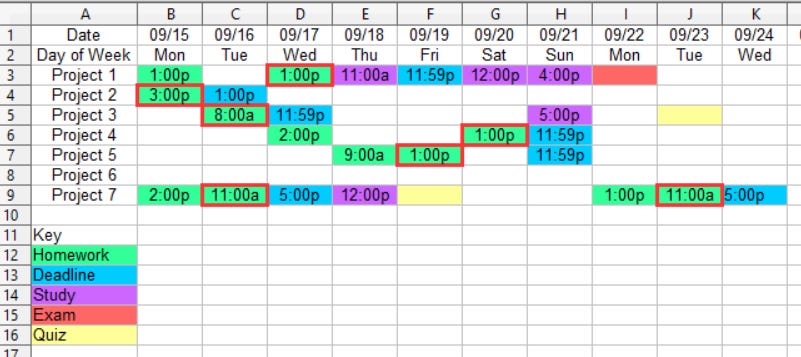
This system was born when I took seven classes in one semester. Each class had its own set of quick, punchy deadlines that changed every week. System 1 is good for keeping track of multiple projects with different moving parts. If you want to get a bunch of unrelated things done in a short period of time, this format helps.
The schedule is read chronologically from left to right. Each column is one day, and each row is a different project or class, with its own set of work and deadlines.
The blue boxes represent deadlines. If you look horizontally along the same row, that’s the project those deadlines belong to.
The green boxes represent days and times I commit to working towards an item with a deadline. Green boxes with red borders indicate “this is the last time you’ll work on this item before the due date, so whatever you’re working on, it has to be completed now.”
Purple boxes are similar, except they’re tasks without deadlines: important, but not urgent.
Yellow and red boxes indicate quizzes and exams, and their biggest function is to let me look ahead at big milestones in the class. If I can see a red box coming up, exams in the class can’t catch me unprepared.
System 2: Weekly schedule spreadsheet
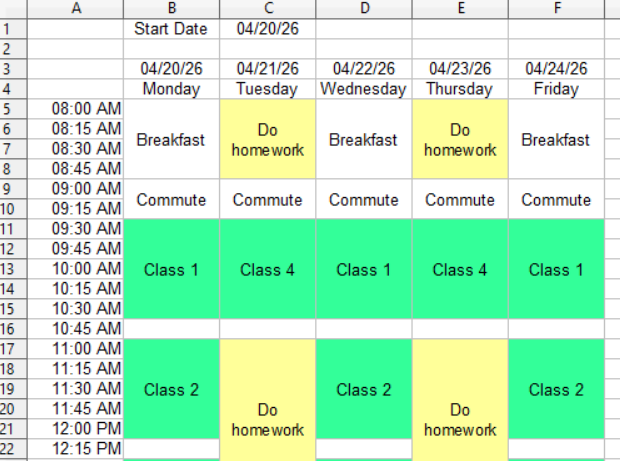
The biggest weakness of system 1 is that you can only assign one item per project per day. If you have two tasks you want to work on for the same project, and you want to do both in the same day, you’re SOL. System 2 is more customizable.
This spreadsheet is read chronologically from top to bottom (in one day) and from left to right (from one day to the next). Blocks of time are assigned a day, time, and task.
The weakest point of this system is that if you have any projects or assignments that run longer than a week, you have to personally write them down somewhere else or remember them week-to-week, because there’s no continuity between weekly plans.
This system also takes a significant amount of time to fill out: to make this work, you need to have enough time for a “sit down and plan the whole week at once” session on Monday.
System 3: Long-term goals spreadsheet
The first two systems are compatible with a short-term and frenetic schedule—I used them almost exclusively in college. When I graduated and started working, my schedule wasn’t so fast-paced anymore.
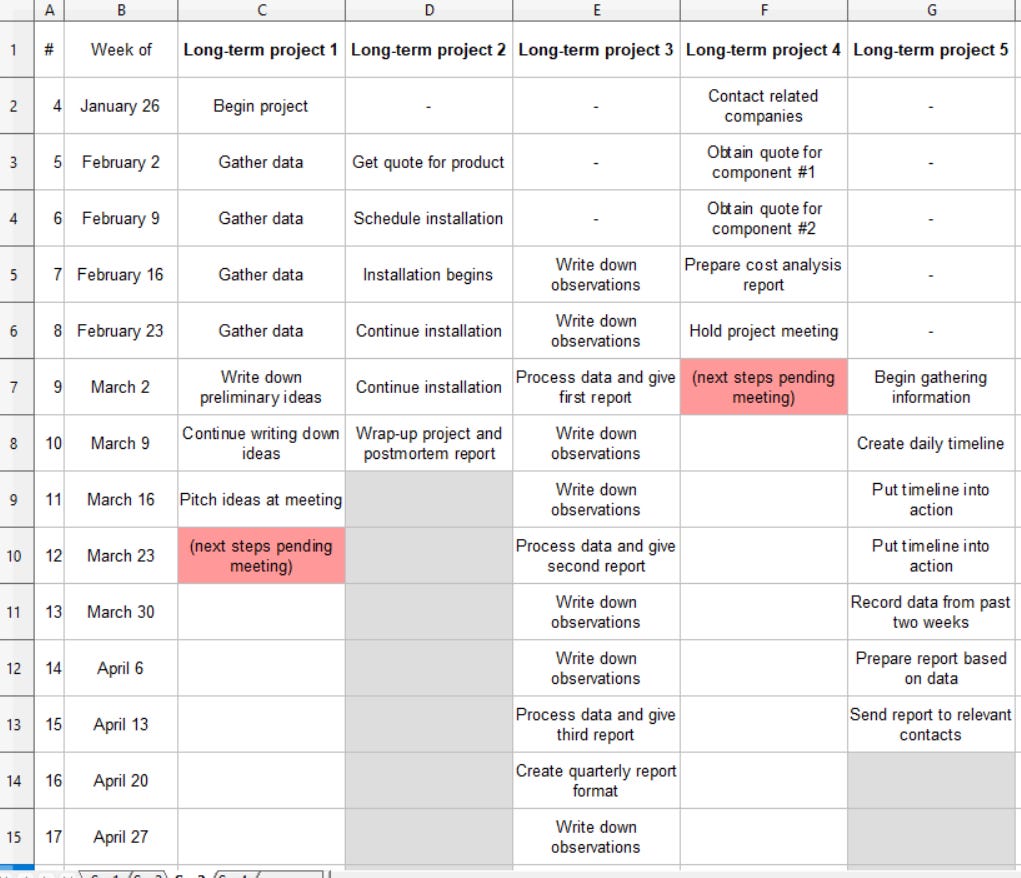
Professional projects tend to be large and span multiple weeks. To keep projects on track long-term and avoid losing focus completely, it helps to plan out an extremely high-level set of weekly goals over the course of months or years.
This spreadsheet is read chronologically from top to bottom. Each row represents an entire week. Each column tracks a single project. When read along a row, it gives you a series of goals you have to hit for the week. When read down a single column, it forecasts the progress of a single multi-week project.
This works best for me when paired with a shorter-term system. Take the weekly milestones, turn them into a more specific to-do list, and run with that.
System 4: No-deadline task list
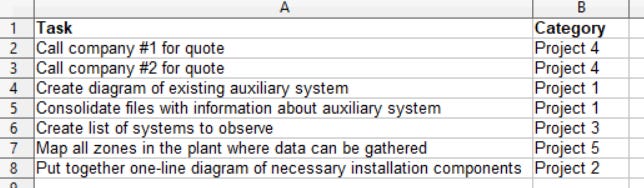
This is the system I pair with system 3. At the beginning of each week, I look at the long-term spreadsheet and make the weekly goals into a bunch of little items. If you have enough items on this list, it pays to start assigning times to them, but it depends on how big of a time crunch you’re under. Just a regular task list—ol’ reliable.
In summary, I collect spreadsheet formats like baseball cards. I haven’t even managed to work Gantt charts into this post. If you have a favorite system, this would be a fantastic place to share.
My mom was the one who took me to the library and made the lunch.